Your team juggles three programs, copies data from emails into a spreadsheet, and someone still has to remember what needs doing. So do you pay for another subscription or build something of your own? Custom business applications win on fit, while off-the-shelf SaaS tools win on a low barrier to entry. Both make sense, just in different situations.
Below you will find decision criteria, a comparison table and a way to work out the return on investment from hours saved, plus two examples from our projects.

Custom business applications vs off-the-shelf SaaS: the difference
SaaS (Software as a Service) is software you rent on a subscription. It runs in the browser, and the provider looks after the servers, updates and security. You get a working tool at once, the same one thousands of other companies use, and you adapt to its logic.
Bespoke software is built around one company’s processes. We design screens, statuses and permissions around how your team actually works. Most often it is a custom web application: it runs in the browser on a computer or phone, so nobody has to install anything.
The difference is who sets the rules. With SaaS, it is the provider and its product roadmap. With a system built for your business, you decide what happens after an order comes in, who gets notified and what data ends up in the report.
When an off-the-shelf tool is enough
First, check whether an existing product already solves the problem. A ready-made tool is usually better when:
- the process is standard and looks much the same in most companies, for example accounting, email, video calls or a simple CRM,
- you need a solution tomorrow, not in a few weeks,
- only a handful of people use the tool, so the subscription is cheap,
- you have not settled on a way of working yet and are still testing it,
- the gap between what you need and what the software offers amounts to minor annoyances that do not cost your team many hours a week.
Plenty of companies run well on a few ready-made services joined by a simple integration. If that is you, do not overpay. Sometimes an automation that moves data between programs is enough, and we build those too as part of our process automation and AI assistants service.
When custom business applications pay off: the decision criteria
A tailor-made system makes sense once off-the-shelf tools start costing more than the subscription invoice shows. Here are the criteria worth going through with your team, one by one.
Your process is your competitive edge
If customers choose you because you serve them differently, build that way of working into a tool. Generic software flattens it. Your own system lets you repeat it whoever is on shift.
Your team loses hours on workarounds
Retyping data, exporting to Excel, manually merging information from two programs and “so we don’t forget” notes mean your tools do not fit the work. Count how long this takes each week. That number will be the basis of your return calculation.
Subscriptions grow with the company
SaaS is usually billed per user or per feature tier. With a few people, the cost is small. With dozens of users across several programs, it starts to look like a loan that never ends. Your own system also costs money to maintain, but that cost does not rise with every new team member.
Your data and customers should stay with you
If your customer list, order history or booking calendar is the heart of the business, it matters where they live and whether you can take them with you. In a bespoke system the database is yours, and you set the access rules.
You need integrations nobody offers
Online payments, invoices, calendar, stock, SMS notifications. When each must behave a little differently from the standard, ready-made plugins fall short. Bespoke software connects them into a single flow.
Customers should be able to serve themselves
When customers enquire by email and you reply with prices and dates, each conversation takes several messages. A system where the customer configures the service and sees the cost straight away shortens that path and takes pressure off the office. Ready-made forms rarely cope with prices that depend on many options at once.
If you nod at two or more of these points, at least cost out the custom option. If none apply, off-the-shelf is probably the better fit.

Comparison: SaaS or a custom system for your business
The table sums up the main differences. Treat it as a starting point, since the balance shifts from case to case.
| Criterion | Off-the-shelf software (SaaS) | Tailor-made system |
|---|---|---|
| Upfront cost | Low, often with a free trial | Higher, you pay for analysis, design and development |
| Subscriptions | Fixed fees, usually rising with the number of users and features | No per-user licence fees, only hosting and technical support remain |
| Fit with your processes | You adapt to the software | The software mirrors the way you work |
| Data ownership | Data sits with the provider, export on its terms | The database belongs to you |
| Development | Depends on the provider’s plans, a feature can disappear or get more expensive | You develop what you need, at your own pace |
| Risk | Price changes, the service shutting down, plan limits | Poorly planned scope, dependence on the developer if documentation is missing |
The custom-side risks can largely be reduced by working in stages, handing over code and documentation, and a contract that clearly states who owns the solution.
Fun fact. The SaaS model made a noisy entrance. In February 2000 Salesforce, then a young start-up selling a browser-based CRM, hired 25 “protesters” to chant against installed software outside a customer conference held by Siebel Systems, the market leader in traditional software, under the banner “the end of software”. Siebel responded by parking three lorries in front of the building, which hid the protest but also blocked its own signs (source: The Holmes Report).
How to calculate the return on bespoke software
The simplest method uses working hours. You need a week of careful observation and a spreadsheet.
- List the repetitive tasks a system could take over: retyping data, sending confirmations, drawing up rotas, preparing documents for the crew.
- Measure the time each one takes per week and multiply it by the number of people who do it.
- Convert hours into money using the full cost of an employee’s hour, meaning salary plus on-costs.
- Add the indirect costs: mistakes and fixing them, lost enquiries, subscriptions you will cancel.
- Subtract the running cost of the new system, meaning hosting, technical support and further development.
An example to adapt. Three people in the office each spend six hours a week retyping orders and answering the same questions. That is 18 hours a week, or about 75 hours a month. If the system takes over two thirds of that work, you get back roughly 50 hours a month. Multiply that by the hourly cost in your company and you have your monthly saving.
The payback period is one calculation: implementation cost divided by monthly saving minus running cost. The result is the number of months before the system starts paying for itself. Recovered hours rarely mean cutting jobs. Usually the team uses them to serve more customers without new hires.
The maths works the other way too. If it turns out you save two hours a month, a custom application will not pay for itself, and you are better off sticking with off-the-shelf software.

How a tailor-made system is built: from workshop to development
A well-run project starts with understanding how the company works, not with coding. We do it in four stages.
1. Workshop
We sit down with management and with the people who will use the system every day. We map the process step by step: where enquiries come from, who handles them, what documents are produced along the way and where information gets lost today. The outcome is a prioritised feature list and an initial quote.
Bring sample documents to the workshop: spreadsheets, forms, order emails. They quickly show what data you really need and where the process gets stuck.
2. MVP, the first working version
We build the smallest scope that already solves the main problem. A simple working module in a few weeks beats waiting six months for a system that does everything on day one. You quickly see what works and what needs fixing before you invest more.
3. Rollout
We move data over from spreadsheets and old programs, set up permissions and train the team. For a short while, run it alongside your current way of working, so nobody is stuck if something needs refining.
4. Development
After a few weeks of use, new ideas appear that nobody foresaw. That is normal and healthy. We develop the system in stages, in the order that brings the most benefit. The code and documentation stay with you, so you are never held hostage by a single developer.
Examples from our work: Panel Weselny and DMD Arena
Two systems we built show when off-the-shelf software stops being enough.
Panel Weselny for Stara Warzelnia
Wedding venues work through dozens of arrangements with every couple: menu, guest numbers, table layout, extras. Ready-made booking software handles the date but does not pass those details to the kitchen and waiting staff. In the system we built for Stara Warzelnia, a wedding venue in Poland, the couple fills in an online form, and that form produces job sheets for the kitchen and the waiting team. The venue calendar and event billing sit in the same place. You can read more about the project in Panel Weselny, a system for wedding venues.
Conference room booking system for DMD Arena Częstochowa
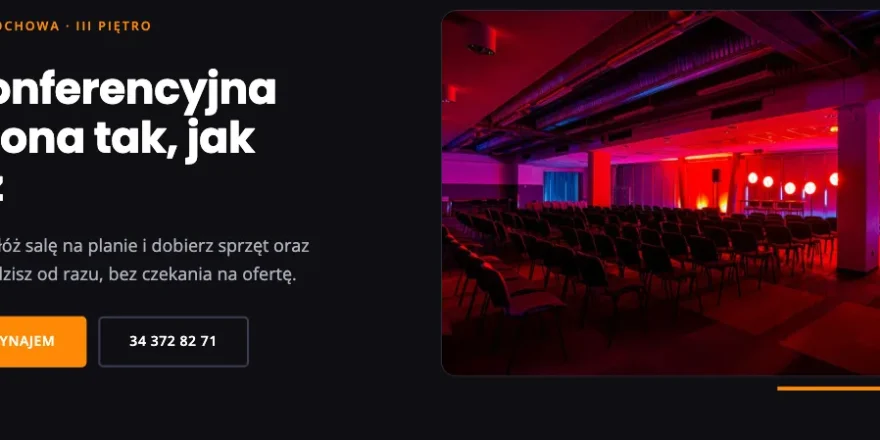
At DMD Arena, a sports and events venue in Częstochowa, southern Poland, the customer picks a date, arranges the room on an interactive floor plan, chooses equipment and catering, and sees the price update as they go. A submitted enquiry holds the date for 72 hours, so two companies cannot book the same room. Staff work in a panel with enquiry statuses, and technical crews receive job sheets as PDF or Excel files. No off-the-shelf booking calendar combines a configurator, date hold and crew documents like this.
Other projects, including subscription platforms with Stripe payments, are in our work.

Frequently asked questions
How much does a custom web application cost?
The cost depends mainly on scope: user roles, integrations, payments and the documents the system generates. A simple module and an extensive platform are completely different budgets. A reliable quote is only possible after the workshop, once the scope is clear. That is why it pays to start with an MVP and build in stages.
How long does it take to build a custom system for a business?
The first working version usually takes a few weeks, and larger systems grow in stages over the following months. Timing depends on scope and on how quickly you make decisions.
Can I connect off-the-shelf software to my own application?
Yes, and it is often the most sensible route. You keep accounting and email in proven services, while your own system handles what is specific to your company and exchanges data with them.
Who owns the code and the data?
They should belong to you, and it is worth putting that in the contract. With bespoke software you get access to the code, the database and the documentation, so another team can take over development if needed.
What if my needs change?
A tailor-made system grows with your company. We add new features in stages, without waiting for a subscription provider to decide they matter to all its customers.
Let’s talk about your process
The choice between SaaS and your own system should rest on the numbers. Off-the-shelf software wins with standard processes and small teams. Custom business applications win where workarounds cost hours, subscriptions keep growing and the way you serve customers is your competitive edge.
To find out which route suits you, tell us how your team works today. We will help you calculate the saving and propose the scope of a first version. Call us on +48 794 505 965 or see how we build custom applications and systems.