Hiring a conference room usually starts with an email: “how much for a room for 150 people?”. Then come questions about dates, seating, a stage, microphones, catering and coffee breaks. The offer goes back and forth for days, and the date is held for no one.
For DMD Arena Częstochowa, a sports and events arena in southern Poland, we built a conference room booking system that moves this conversation onto the website. Clients configure their hire of the third-floor rooms and see the price at once. Staff get a complete enquiry with a room plan and quote, and technical crews get job sheets saying what to prepare.
The client configurator: six steps instead of endless emails
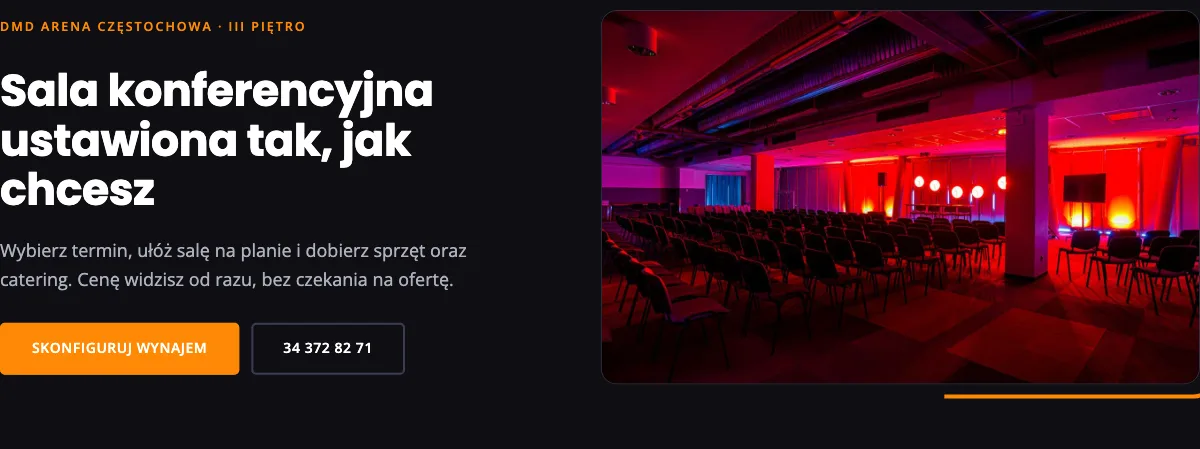
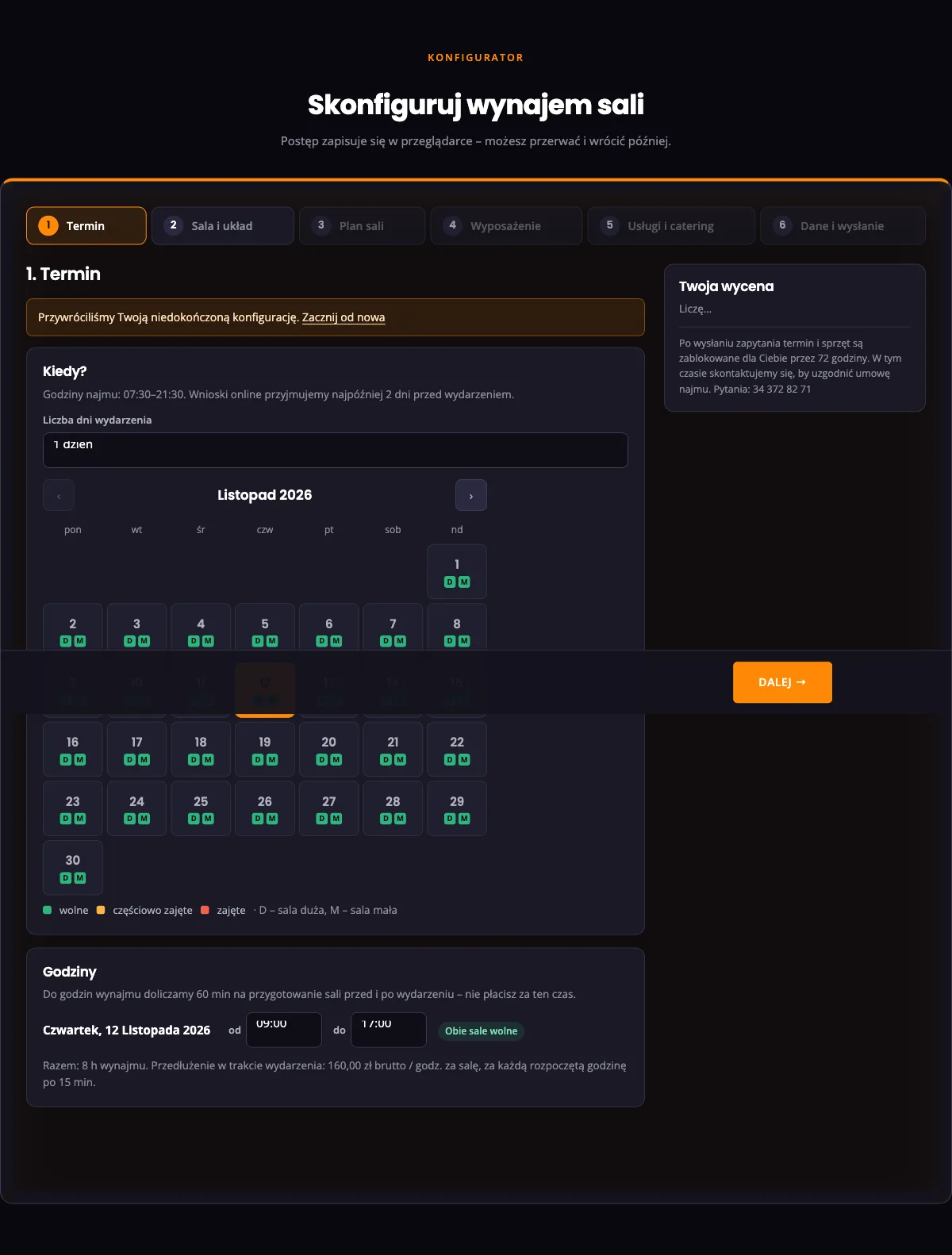
On hala-czestochowa.pl/rezerwacja-sali-konferencyjnej clients go through six steps. Progress is saved in the browser, so they can finish later.
- Date. The calendar shows each day’s availability for both rooms: green, orange (partly booked) or red. Events last one to three days, and an hour of setup before and after is added free.
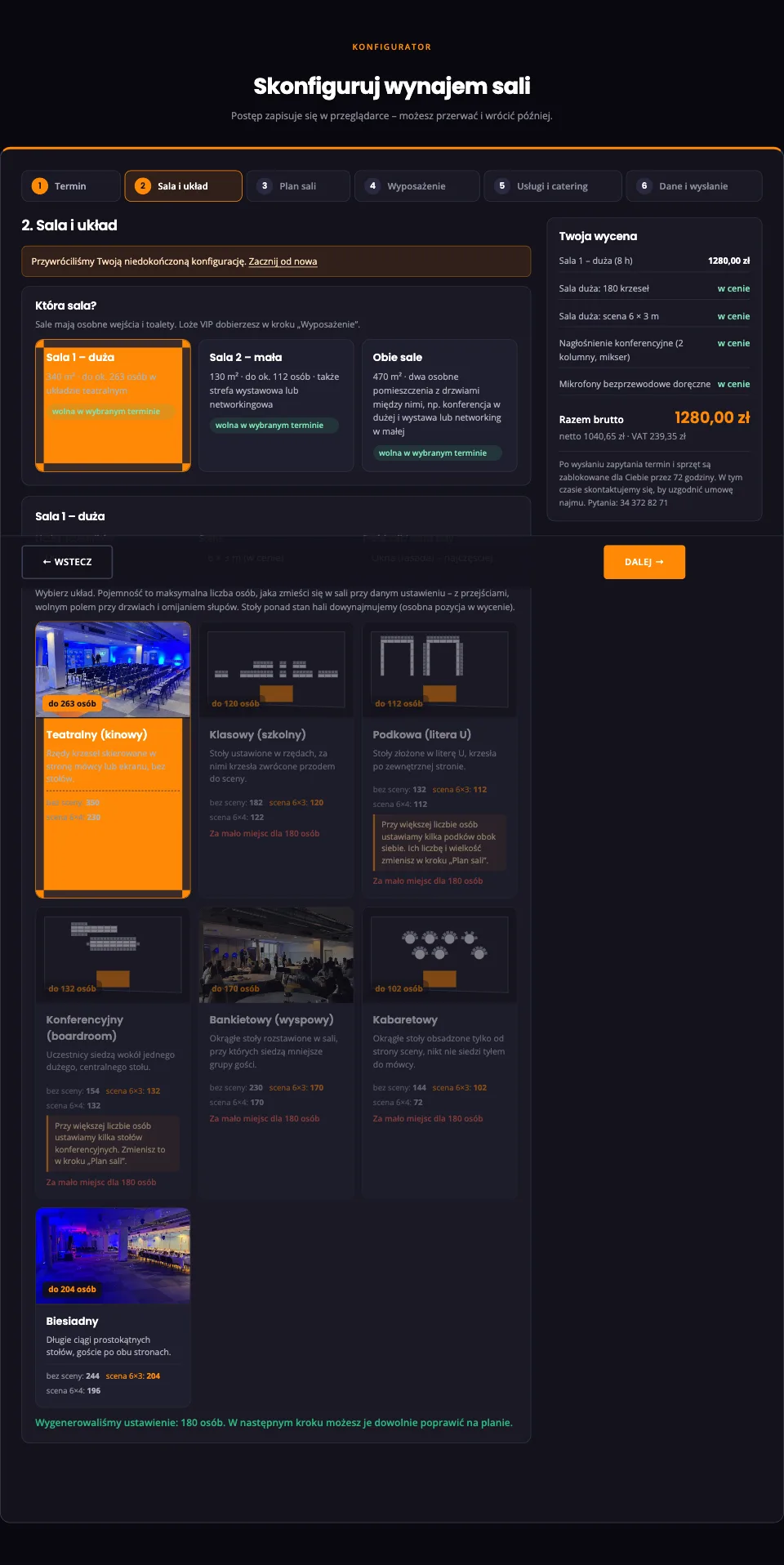
- Room and layout. The large room (340 m², up to 350 people), the small one (130 m²) or both. The client enters guest numbers, the stage and its wall, then picks a layout: theatre, classroom, banquet, cabaret, long tables, U-shape, boardroom or networking.
- Room plan. The system generates a setup to adjust on an interactive plan.
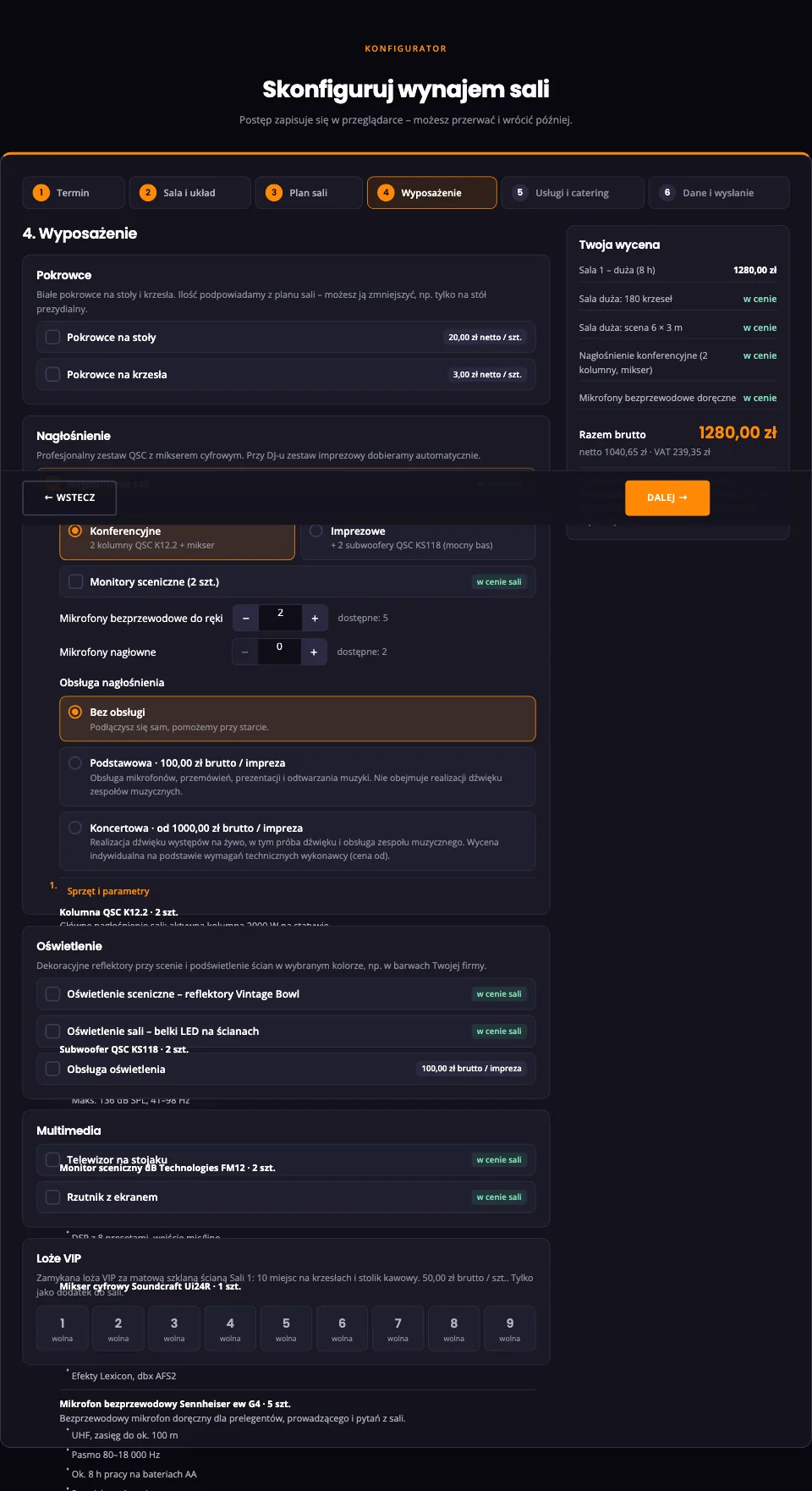
- Equipment. Sound, lighting in brand colours, AV, chair covers and VIP boxes.
- Services and catering. DJ, host, four catering packages with a choice of dishes, and coffee breaks.
- Details and sending. A full summary, consents and a “Send enquiry” button.
Capacity calculated from the real floor plan
Each layout card shows three numbers: capacity without a stage, with a 6 × 3 m stage and with a 6 × 4 m stage. These are not brochure figures. The system calculates them from the room’s parameters: seat width, row spacing, the clear strip before the stage, aisles, the emergency exit zone and pillars. If a layout cannot fit the guests, the card is greyed out and says why.
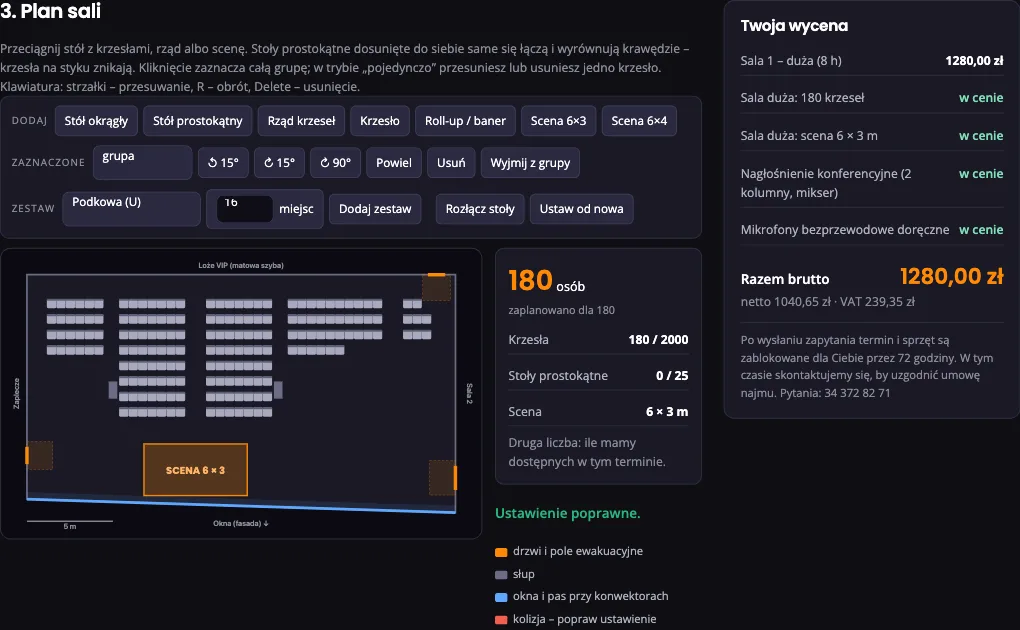
An interactive room plan
Clients can rearrange the layout with a mouse or finger: move a table with its chairs, rotate a row, add a roll-up banner or cocktail table. Rectangular tables placed within about 30 cm join up and move together. The plan shows doors, the emergency exit zone, pillars and the window strip, and marks collisions in red. Counters show how many chairs and tables the plan uses and how many are free that day.
If the plan needs more furniture than the arena owns, the enquiry still goes through. The quote adds an “extra hire” line, price to be confirmed.
The price, visible straight away
The “Your quote” panel updates with every change. Paid items show an amount, and equipment covered by the hire is marked “included”. The DJ and host are “to be confirmed”: staff check availability first, then add them to the total. Catering and coffee breaks are priced per person and per break.
The quote is saved with the enquiry. If the arena changes its prices, submitted offers keep the prices from the day they were sent.
An enquiry that holds the date immediately
Once sent, the client gets an enquiry number, a summary email and an account to amend the offer or download a PDF. The date, rooms, boxes and equipment are then held for 72 hours, and nobody else can book them.
Staff have three days to make contact and press one button:
- In negotiation extends the hold by 7 days and emails the client “Date on hold”.
- Contract signed confirms the date permanently.
- Release date frees the date, with a mandatory reason in the log.
24 hours before the hold ends, the system reminds staff to decide. If nobody does, the offer expires, the date is freed and the client gets a one-click link to reinstate the offer if the date is still free.
The staff panel behind the conference room booking system
Staff have their own WordPress role and see only the booking panel: a dashboard of pending requests with time left on each hold, a searchable offer list, a monthly calendar of rooms and boxes, and the price list. Posts, pages and plugins are hidden.
The offer card gathers everything agreed, split into zones: stage and sound, lighting, room setup, catering and coordinator. Staff add crew notes to any item, such as “Stage ready by 8:00”. Every change by client or staff creates a new version with the old value struck through, and the log records who changed what.
Bar colours in the calendar show each offer’s status. Staff also add manual blocks, say for a match or servicing, which clients see as unavailable.
Job sheets for the crews
On “Contract signed”, the system sends each zone its job sheet: a PDF and Excel file with the date, rooms, that zone’s items, notes and the room plan. The sound technician gets only their list, catering only theirs. If the offer changes after signing, the affected zones and the coordinator get an email listing the changes and a new sheet.
Staff edit the price list, equipment stock, menus, layout descriptions and room parameters in the panel, without a developer. New prices go live at once.
What the venue gains
- Clients get a price in minutes, evenings and weekends included.
- Enquiries arrive complete: date, layout, plan, equipment, catering and quote.
- No double bookings, and holds do not linger forever.
- Crews get job sheets with the room plan, not retyped notes.
- The version history and log show who agreed what and when.
We can build a system like this for your venue
The system is a WordPress plugin, so it works with your existing website. We configure rooms, layouts, equipment, prices, catering and emails for your venue: a hotel with conference rooms, a conference centre, an arena, a restaurant with a banqueting suite or a coworking space. Guides for clients and staff come with the rollout.
See the system live: DMD Arena room configurator (in Polish). The arena’s website is covered in our Częstochowa Sports Hall case study, and a similar approach to wedding planning in the Wedding Panel article. If you are weighing up your own system, read our guide to online booking systems for websites.